


If you use Snapchat regularly, you have probably noticed a small green dot appear next to someone’s Bitmoji or profile photo. It is easy to overthink it. Are they actively chatting. Are they looking at your Stories. Are they ignoring you on purpose.
The green dot looks simple, but it raises a lot of questions. What it actually means is far less dramatic than most people assume, and understanding it can save you from unnecessary guessing.
This article breaks down what the green dot on Snapchat really means, where it appears, how accurate it is, how it compares to other social apps, and what you can do if you do not want others to see when you are active.
Everything explained here reflects how Snapchat currently works and remains accurate going into 2026.
What the Green Dot Means on Snapchat

The green dot on Snapchat simply means that the person is currently active on the app.
That is all it indicates. It does not mean they are chatting. It does not mean they are viewing your Stories. It does not mean they are typing a message. It only means Snapchat is open and being used at that moment or very recently.
You will usually see the green dot next to a person’s Bitmoji or profile picture. It appears in places like your chat list or on their profile when you are about to send them a message.
Snapchat uses the green dot as an activity indicator, not a behavior tracker.
Why People Pay Attention to the Green Dot
From a practical standpoint, the green dot can be helpful. If someone is active, they are more likely to see a message sooner. If you want a quicker response, sending a message while the green dot is visible can make sense.
It can also influence timing. Some users choose to send friend requests or messages when they see someone is active, knowing the person is already on the app and may respond right away.
At the same time, the green dot can create social pressure. Seeing that someone is active but not responding can make people feel ignored, even when that is not the case. The dot shows presence, not availability.
At its core, the green dot is Snapchat’s way of saying, “This person is here right now.” What you read into that is up to you.
How Long the Green Dot Stays Visible
The green dot usually appears while a person is actively using Snapchat. This can include opening snaps, checking chats, viewing Stories, or simply moving around inside the app.
Once they stop being active, the dot may disappear after a short period. Snapchat does not publish an exact time frame. The indicator is meant to reflect recent activity, not something that happened hours ago.
Because of this, the dot is not a perfect real-time signal. It is closer to a general activity hint than a live status.
How Accurate the Green Dot Really Is
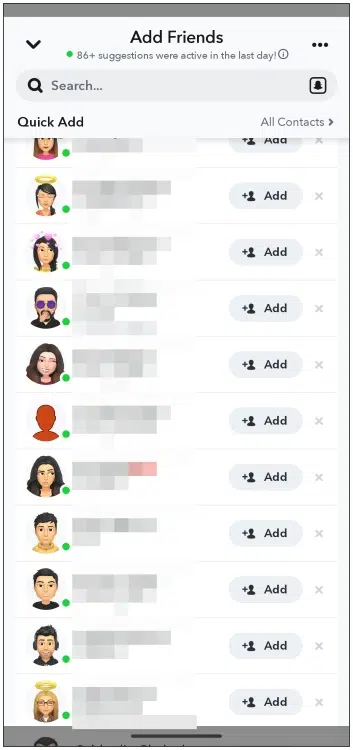
The green dot is useful, but it is not something you can read too literally.
Someone can show as active without actually paying attention to messages. Snapchat might be open while they are doing something else, or they may have opened the app and set their phone down for a moment. In those cases, the dot can still appear even though they are not really engaging.
There can also be small delays. The dot might linger briefly after someone closes the app, or take a second to show up after they open it. On top of that, privacy settings can affect what you see. If someone limits who can view their activity, the green dot may not appear for you at all.
Because of this, the green dot works best as a general hint, not a precise signal. It tells you the app is in use, not what the person is doing or whether they are available.
Does the Snapchat Green Dot Mean Someone Is Chatting?
No.
The green dot does not tell you what someone is doing inside Snapchat. They could be watching Stories, browsing Snap Map, adjusting settings, or doing nothing at all.
It does not mean they are typing. It does not mean they are reading messages. It does not mean they are choosing not to reply.
It only confirms that the app is open or was recently open.
Does the Green Dot Work the Same on Android and iOS?

Functionally, yes.
The green dot behaves the same on Android and iOS devices. You may notice small differences in timing or appearance depending on app version or system performance, but the meaning does not change.
If you see differences between devices, it is usually due to app updates rolling out at different times, not because the feature works differently.
How to Disable the Green Dot on Snapchat
If you do not want others to see when you are active, Snapchat allows you to turn off the green dot. This is controlled through a setting called the Activity Indicator.
To turn it off:
- Open Snapchat and tap your Bitmoji or profile icon.
- Tap the gear icon to open Settings.
- Scroll to Privacy Controls.
- Tap Activity Indicator.
- Turn off the option that allows friends to see when you are active.
Once disabled, the green dot will no longer appear next to your name.
There is an important tradeoff. When you turn off your Activity Indicator, you will also stop seeing green dots for other people. Snapchat keeps this feature mutual.
Typing indicators and read receipts still work normally. Turning off the green dot only hides your active status.
Snapchat Green Dot Compared to Other Social Apps
The green dot on Snapchat is not unique. Many social platforms use similar activity indicators, even if they look different.
On Snapchat, the green dot shows current activity if the setting is enabled. It appears next to the Bitmoji or profile photo and does not reveal what the user is doing.
Other platforms use variations of this idea. Some show “online,” some show “active minutes ago,” and some combine activity with typing indicators. Snapchat keeps it simple by only signaling presence, not behavior.
The main similarity across platforms is reciprocity. If you hide your activity status, you usually lose the ability to see others’ status as well.
Other Snapchat Indicators You Might See
Snapchat uses many visual indicators, and each one has a specific meaning.
The yellow heart appears when two people snap each other the most. It reflects frequent interaction and can disappear if that pattern changes.
Colored arrows indicate snaps and chats. Red arrows represent snaps without sound. Purple arrows represent snaps with sound. Blue arrows represent chat messages. Solid arrows mean delivered. Hollow arrows mean opened.
Blue circles indicate received chat messages. When the circle disappears, the message has been read.
The fire emoji shows up when you and a friend keep a snap streak going by sending snaps back and forth every day. If you see a number next to it, that’s simply how many days in a row the streak has been active.
Like the green dot, these symbols are meant to give a bit of context at a glance. They hint at interaction, not the full story behind it.
Final Thoughts
The green dot on Snapchat is a small feature, but it influences how people interpret availability and responsiveness. It simply shows that someone is active on the app, nothing more.
It does not mean they are chatting. It does not mean they are ignoring you. It does not mean they are watching your Stories.
Once you understand that, the green dot becomes less stressful and more neutral. You can choose to use it as a timing hint, turn it off for privacy, or ignore it entirely.
Like most social features, it works best when you do not read too much into it.
Read Also